
Travable — Conversational Travel Service
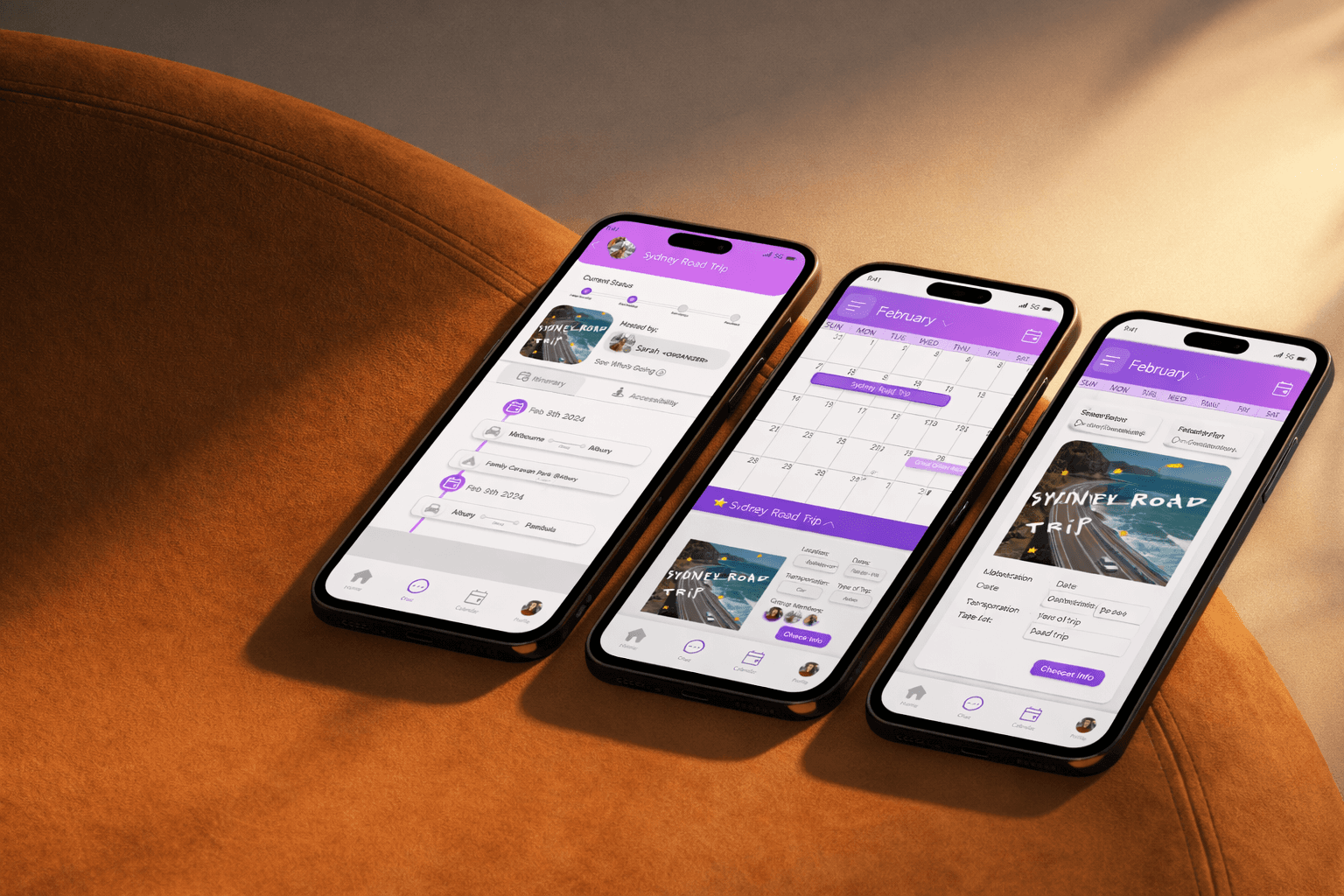
Designed an end-to-end mobile travel planning experience supported by a conversational AI agent, helping university students plan, prepare for, and navigate domestic travel with clarity and confidence.
ROLE SNAPSHOT
Led UX/UI design of the mobile app from early sketches to high-fidelity prototype
Designed the service logic and conversational agent supporting the app experience
Managed project direction, user testing, and accessibility considerations
Client
University Service Design Project
Timeline
3 months
Focus Areas
Services: Product Design · UX/UI · Service Design · Conversational Design
CONTEXT
Travable is a travel planning service designed to support university students exploring domestic travel across Australia. While inspiration is easy to find, students often struggle to organise trips in a way that feels structured, affordable, and manageable—especially when coordinating dates, locations, and group logistics.
The project explored a multi-touchpoint service, including a mobile app as the primary interface, supported by a conversational AI agent to assist users before, during, and in unexpected travel situations. All digital touchpoints were designed in alignment with WCAG 2.1 Level AA accessibility standards.
PROBLEM
Users felt overwhelmed planning trips involving multiple destinations and timelines
Travel information was fragmented across apps, notes, and messages
Existing tools lacked support during active travel moments and emergencies
APPROACH
Analysed provided user research, personas, constraints, and accessibility requirements
Defined problem statements using How Might We questions
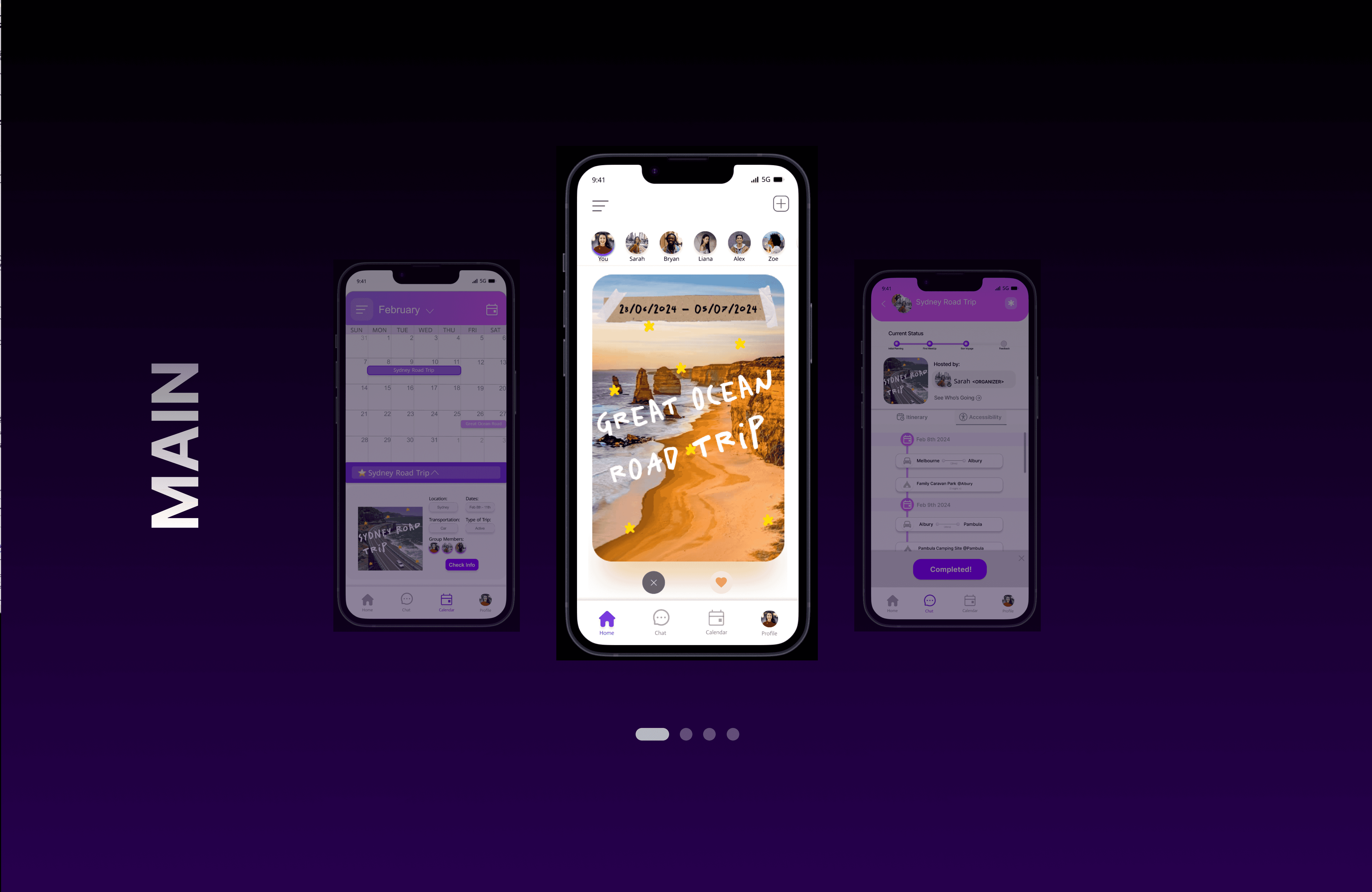
Designed the mobile app as the core planning interface, with the conversational agent as a supporting layer
Iterated through sketches, wireframes, service artefacts, and functional prototypes
KEY DESIGN DECISIONS
#Decision Theme 1 — Reducing planning overwhelm through structure
Trip planning was broken into clear, manageable steps to help users feel in control rather than overloaded.
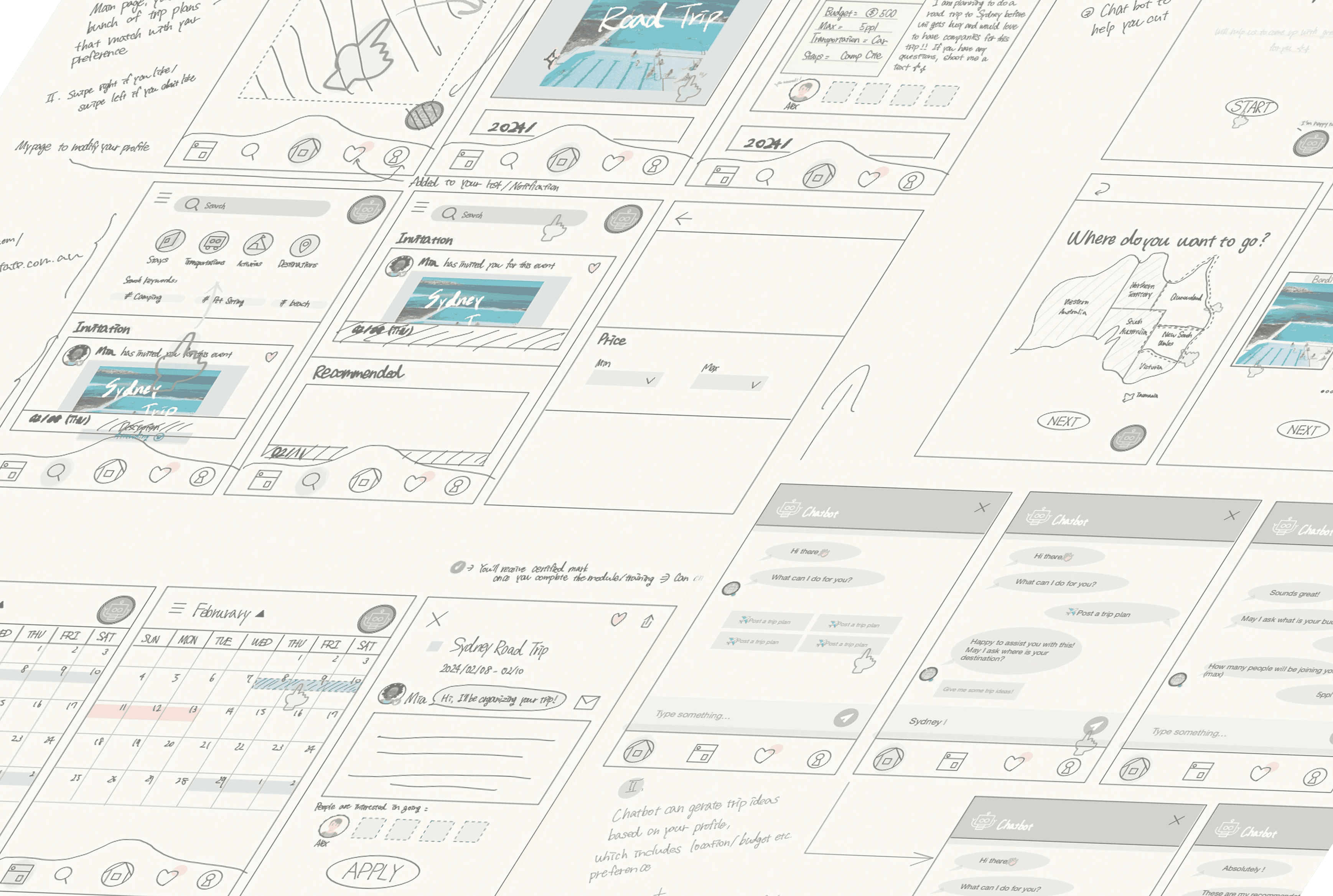
Lo-fi sketches and trip setup screens showing destinations, dates, and key details introduced progressively.
#Decision Theme 2— Centralising itinerary information across the app
The app was designed as a single source of truth, consolidating key trip information into one scannable itinerary.
Design focus:
Clear hierarchy for dates, locations, and activities
Reduced reliance on external notes or tools
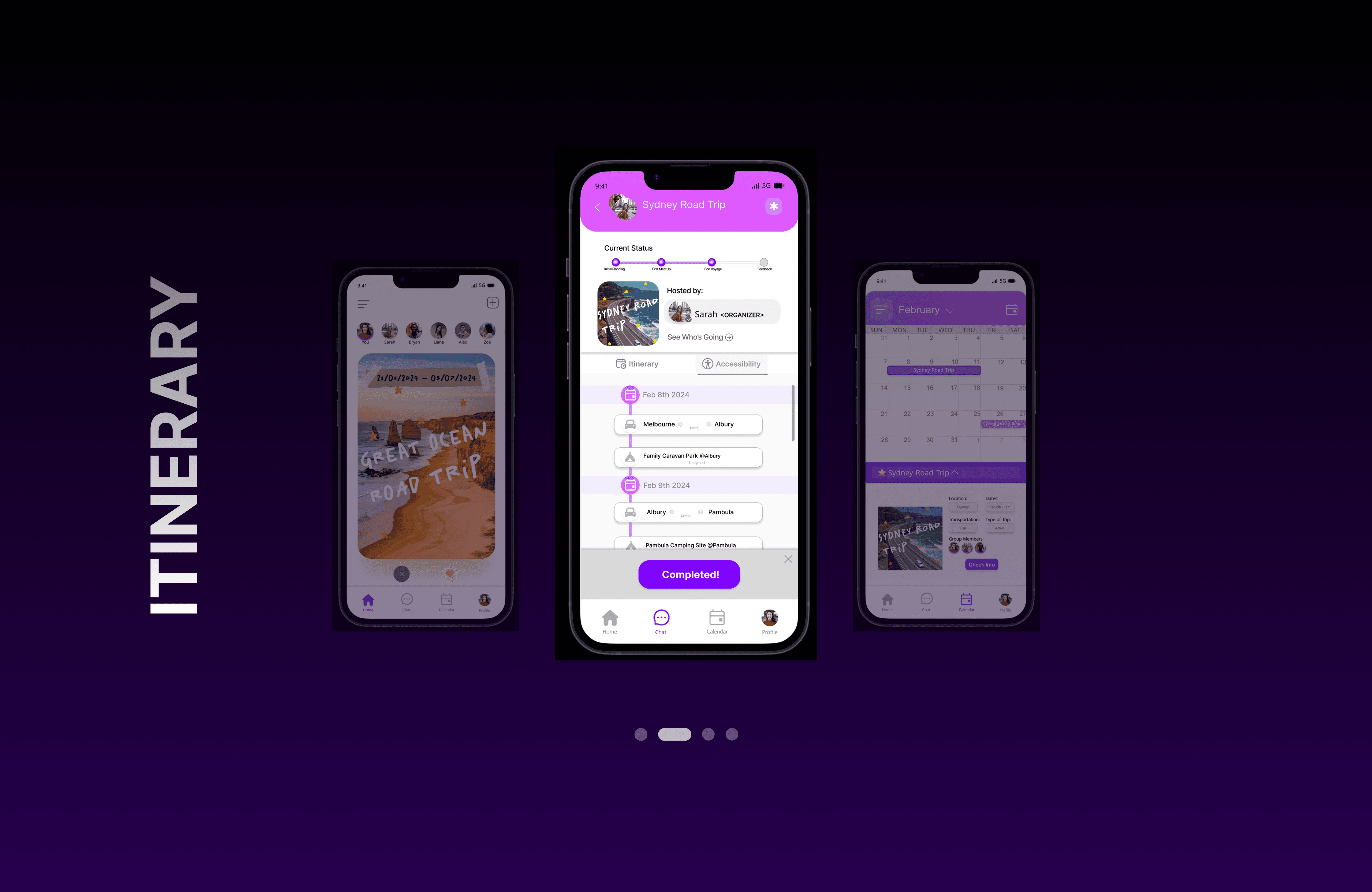
Itinerary and calendar screens showing trip timelines, daily plans, and group context in one place.
#Decision Theme 3 — Designing for on-the-go mobile use and accessibility
The app was designed for use during travel, not just planning beforehand.
Design focus:
Mobile-first layouts with clear hierarchy and large touch targets
Minimal input during high-attention or stressful moments
Accessibility embedded across UI and conversational flows
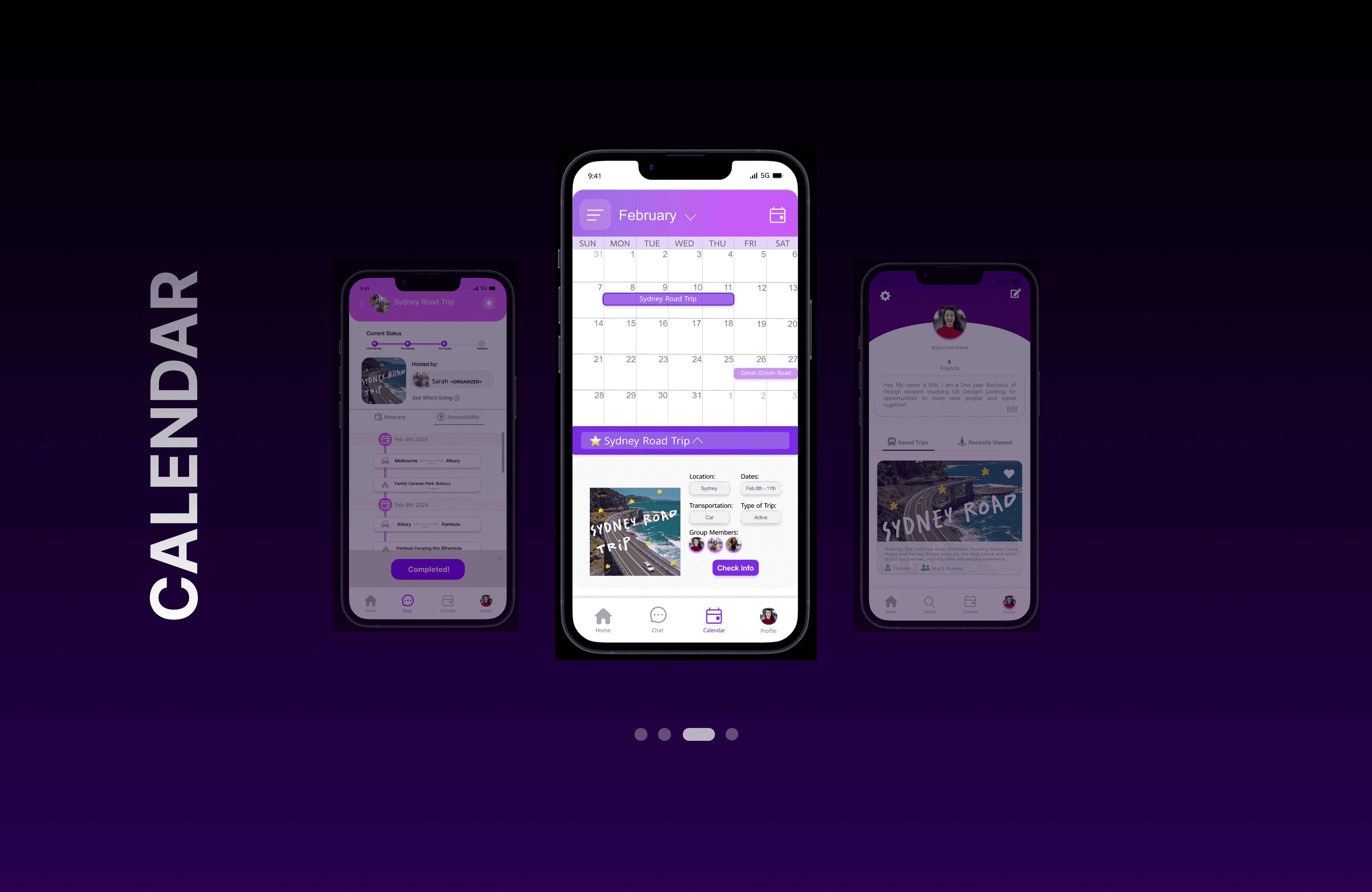
High-fidelity mobile screens optimised for quick checks, paired with accessible conversational patterns.
#Decision Theme 4 — Supporting travel moments with conversational assistance
Rather than replacing the app, the conversational agent was designed to support users when screens are inconvenient or information is urgent.
Design focus:
Conversational support for packing, itinerary questions, and preparation
Emergency flows that escalate to authorities or trip leads when needed
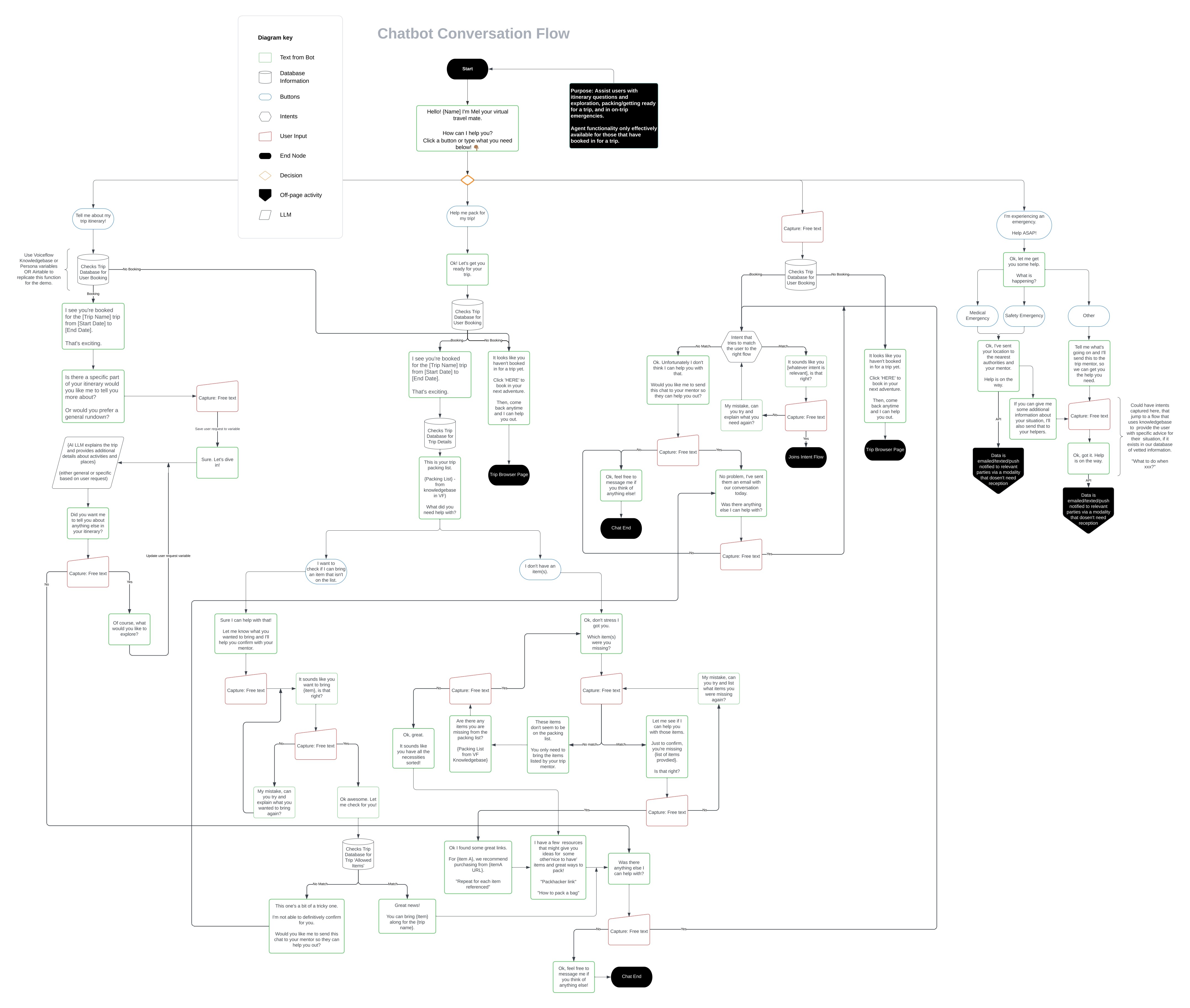
Lucidchart conversation flow diagrams mapping every possible user path.
OUTCOME
Delivered a cohesive mobile app prototype supported by a functional conversational agent
Reduced cognitive load through structured planning and centralised information
Demonstrated how AI agents can complement—not replace—core app experiences
Established a scalable service and UX foundation for future expansion
REFLECTION
This project reinforced how challenging it is to design services that span screens, conversations, and real-world contexts. I learned to balance system-level thinking with detailed UI execution, and to design AI interactions that meaningfully support users rather than distract from core tasks. It deepened my interest in building agent-supported products grounded in strong UX fundamentals.
Check out some of my recent projects.

Travable — Conversational Travel Service
Designed an end-to-end mobile travel planning experience supported by a conversational AI agent, helping university students plan, prepare for, and navigate domestic travel with clarity and confidence.
ROLE SNAPSHOT
Led UX/UI design of the mobile app from early sketches to high-fidelity prototype
Designed the service logic and conversational agent supporting the app experience
Managed project direction, user testing, and accessibility considerations
Client
University Service Design Project
Timeline
3 months
Focus Areas
Services: Product Design · UX/UI · Service Design · Conversational Design
CONTEXT
Travable is a travel planning service designed to support university students exploring domestic travel across Australia. While inspiration is easy to find, students often struggle to organise trips in a way that feels structured, affordable, and manageable—especially when coordinating dates, locations, and group logistics.
The project explored a multi-touchpoint service, including a mobile app as the primary interface, supported by a conversational AI agent to assist users before, during, and in unexpected travel situations. All digital touchpoints were designed in alignment with WCAG 2.1 Level AA accessibility standards.
PROBLEM
Users felt overwhelmed planning trips involving multiple destinations and timelines
Travel information was fragmented across apps, notes, and messages
Existing tools lacked support during active travel moments and emergencies
APPROACH
Analysed provided user research, personas, constraints, and accessibility requirements
Defined problem statements using How Might We questions
Designed the mobile app as the core planning interface, with the conversational agent as a supporting layer
Iterated through sketches, wireframes, service artefacts, and functional prototypes
KEY DESIGN DECISIONS
#Decision Theme 1 — Reducing planning overwhelm through structure
Trip planning was broken into clear, manageable steps to help users feel in control rather than overloaded.
Lo-fi sketches and trip setup screens showing destinations, dates, and key details introduced progressively.
#Decision Theme 2— Centralising itinerary information across the app
The app was designed as a single source of truth, consolidating key trip information into one scannable itinerary.
Design focus:
Clear hierarchy for dates, locations, and activities
Reduced reliance on external notes or tools
Itinerary and calendar screens showing trip timelines, daily plans, and group context in one place.
#Decision Theme 3 — Designing for on-the-go mobile use and accessibility
The app was designed for use during travel, not just planning beforehand.
Design focus:
Mobile-first layouts with clear hierarchy and large touch targets
Minimal input during high-attention or stressful moments
Accessibility embedded across UI and conversational flows
High-fidelity mobile screens optimised for quick checks, paired with accessible conversational patterns.
#Decision Theme 4 — Supporting travel moments with conversational assistance
Rather than replacing the app, the conversational agent was designed to support users when screens are inconvenient or information is urgent.
Design focus:
Conversational support for packing, itinerary questions, and preparation
Emergency flows that escalate to authorities or trip leads when needed
Lucidchart conversation flow diagrams mapping every possible user path.
OUTCOME
Delivered a cohesive mobile app prototype supported by a functional conversational agent
Reduced cognitive load through structured planning and centralised information
Demonstrated how AI agents can complement—not replace—core app experiences
Established a scalable service and UX foundation for future expansion
REFLECTION
This project reinforced how challenging it is to design services that span screens, conversations, and real-world contexts. I learned to balance system-level thinking with detailed UI execution, and to design AI interactions that meaningfully support users rather than distract from core tasks. It deepened my interest in building agent-supported products grounded in strong UX fundamentals.
Check out some of my recent projects.
Travable — Conversational Travel Service
Designed an end-to-end mobile travel planning experience supported by a conversational AI agent, helping university students plan, prepare for, and navigate domestic travel with clarity and confidence.
ROLE SNAPSHOT
Led UX/UI design of the mobile app from early sketches to high-fidelity prototype
Designed the service logic and conversational agent supporting the app experience
Managed project direction, user testing, and accessibility considerations
Client
University Service Design Project
Timeline
3 months
Focus Areas
Services: Product Design · UX/UI · Service Design · Conversational Design
CONTEXT
Travable is a travel planning service designed to support university students exploring domestic travel across Australia. While inspiration is easy to find, students often struggle to organise trips in a way that feels structured, affordable, and manageable—especially when coordinating dates, locations, and group logistics.
The project explored a multi-touchpoint service, including a mobile app as the primary interface, supported by a conversational AI agent to assist users before, during, and in unexpected travel situations. All digital touchpoints were designed in alignment with WCAG 2.1 Level AA accessibility standards.
PROBLEM
Users felt overwhelmed planning trips involving multiple destinations and timelines
Travel information was fragmented across apps, notes, and messages
Existing tools lacked support during active travel moments and emergencies
APPROACH
Analysed provided user research, personas, constraints, and accessibility requirements
Defined problem statements using How Might We questions
Designed the mobile app as the core planning interface, with the conversational agent as a supporting layer
Iterated through sketches, wireframes, service artefacts, and functional prototypes
KEY DESIGN DECISIONS
#Decision Theme 1 — Reducing planning overwhelm through structure
Trip planning was broken into clear, manageable steps to help users feel in control rather than overloaded.
Lo-fi sketches and trip setup screens showing destinations, dates, and key details introduced progressively.
#Decision Theme 2— Centralising itinerary information across the app
The app was designed as a single source of truth, consolidating key trip information into one scannable itinerary.
Design focus:
Clear hierarchy for dates, locations, and activities
Reduced reliance on external notes or tools
Itinerary and calendar screens showing trip timelines, daily plans, and group context in one place.
#Decision Theme 3 — Designing for on-the-go mobile use and accessibility
The app was designed for use during travel, not just planning beforehand.
Design focus:
Mobile-first layouts with clear hierarchy and large touch targets
Minimal input during high-attention or stressful moments
Accessibility embedded across UI and conversational flows
High-fidelity mobile screens optimised for quick checks, paired with accessible conversational patterns.
#Decision Theme 4 — Supporting travel moments with conversational assistance
Rather than replacing the app, the conversational agent was designed to support users when screens are inconvenient or information is urgent.
Design focus:
Conversational support for packing, itinerary questions, and preparation
Emergency flows that escalate to authorities or trip leads when needed
Lucidchart conversation flow diagrams mapping every possible user path.
OUTCOME
Delivered a cohesive mobile app prototype supported by a functional conversational agent
Reduced cognitive load through structured planning and centralised information
Demonstrated how AI agents can complement—not replace—core app experiences
Established a scalable service and UX foundation for future expansion
REFLECTION
This project reinforced how challenging it is to design services that span screens, conversations, and real-world contexts. I learned to balance system-level thinking with detailed UI execution, and to design AI interactions that meaningfully support users rather than distract from core tasks. It deepened my interest in building agent-supported products grounded in strong UX fundamentals.